
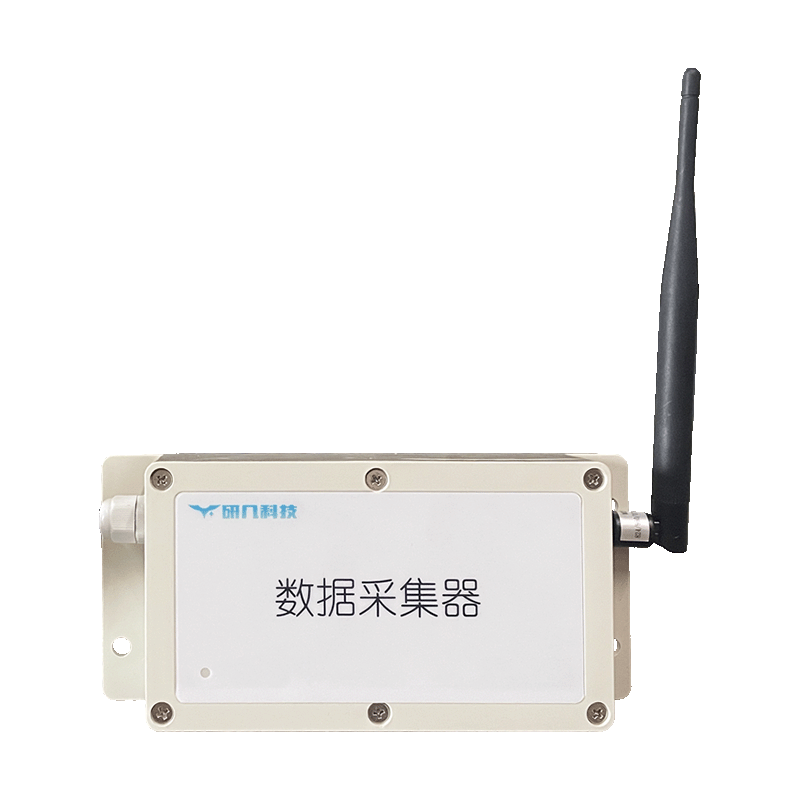
Appearance
Y921 RS485 Cloud Data Logger Specification
Contents
- Overview
- Standard Models and Configuration
- YenGear IoT Cloud
- Data Path and Operating Boundary
- Selection and Ordering
- Installation Requirements
- Contact
1. Overview
Y921 provides four RS485 interfaces and uses Modbus RTU to collect operating data from sensors, meters, controllers, and other field devices. Y921-G, Y921-W, and Y921-R connect through 4G, Wi-Fi, and RJ45 Ethernet, respectively. The standard product connects to YenGear IoT Cloud; third-party platform integration is available as a project customization.
Y921 collects and reports data. It does not control field devices. Real-time collection depends on the network connection. During a network interruption, Y921 does not create collection records, cache data, or backfill the interrupted period. After the network returns, the device reconnects automatically and resumes real-time collection.
Compatible Field Devices
- Temperature, humidity, level, pressure, water-quality, and other sensors using RS485 Modbus RTU
- Electricity meters, flow meters, and other instruments using RS485 Modbus RTU
- PLCs, controllers, and field equipment whose operating status or measurements can be read through RS485 Modbus RTU
Standard Y921 models do not accept analog signals directly. Use a customized Y921 or a suitable signal converter when the project requires analog acquisition.
2. Standard Models and Configuration
Select Y921-G, Y921-W, or Y921-R from the available site network. Each standard model provides one uplink network.
| Model | Uplink Network | Typical Site Condition |
|---|---|---|
Y921-G | 4G | No stable wired network or Wi-Fi at the site |
Y921-W | Wi-Fi | Stable wireless LAN is available |
Y921-R | RJ45 Ethernet | Stable wired Ethernet is available |
A project that requires two or more uplink networks needs a customized combined-network configuration.
Standard Configuration
| Item | Standard Specification |
|---|---|
| Collection interfaces | 4 × RS485 |
| Field protocol | Modbus RTU |
| Uplink network | One of 4G, Wi-Fi, or RJ45 Ethernet, selected by model |
| Primary functions | Data collection and status reporting |
| Operating mode | Online real-time collection |
| Network interruption | No collection, cache, or backfill during the interruption |
| Recovery | Reconnects and resumes real-time collection after the network returns |
Project Customization
| Item | Customization Scope |
|---|---|
| Collection interface | RS232 |
| Signal acquisition | Analog signals |
| Uplink network | Combined networks |
| Field protocol | Serial protocols other than Modbus RTU |
| Platform | Third-party platform integration |
Customization depends on the required interfaces, signals, protocols, network, and integration tests.
3. YenGear IoT Cloud
Users configure collection points and Modbus parameters in YenGear IoT Cloud, including slave address, register address, data format, byte order, scaling factor, and collection interval.
The platform displays real-time data, stores historical records, and processes alarms according to the configured collection points. Y921 reads and uploads the field data.
4. Data Path and Operating Boundary
text
RS485 sensors, meters, or controllers
                 ↓
               Y921
                 ↓
       4G / Wi-Fi / Ethernet
                 ↓
         YenGear IoT Cloud
                 ↓
   Real-time data / history / alarms
Y921 reads and reports field data only. Use a product with verified control outputs when a project must start, stop, or otherwise control pumps, fans, lighting, or other loads.
Network loss affects the collection path itself, not only cloud display. The device produces no records for the disconnected interval and does not upload missing historical data after reconnection.
5. Selection and Ordering
Selection Steps
- Confirm that the field equipment uses RS485 Modbus RTU, or provide the required interface and protocol customization.
- Select
Y921-G,Y921-W, orY921-Rfrom the site network. - Provide the field-device manuals, Modbus register maps, and communication parameters.
- Confirm site power, mounting, wiring, antenna, and Ethernet-cable conditions.
Information Required Before Ordering
| Item | Required Information |
|---|---|
| Standard model | Y921-G, Y921-W, or Y921-R |
| Field devices | Name, quantity, model, and product manual |
| RS485 settings | Slave address, baud rate, parity, and register map |
| Collection points | Data items, units, and required collection interval |
| Customization | RS232, analog signals, combined networks, other serial protocols, or third-party platform integration |
| Site conditions | Power, installation space, network coverage, and cable routing |
The supported device count and collection-point count depend on baud rate, register count, collection interval, and field communication quality. Confirm them from the actual point list before ordering.
Power input, operating temperature, dimensions, mounting, interface protection, and accessories depend on the communication version and enclosure configuration. Confirm these parameters for the selected configuration.
6. Installation Requirements
- Install the device where wiring, inspection, and maintenance remain accessible.
- Connect RS485 A/B lines according to the field-device manual and verify polarity.
- Assign a unique address to each device on the same bus and use consistent communication settings.
- Keep
Y921-GandY921-Waway from strong interference and large metal obstructions. - Use Ethernet cabling and network equipment suitable for the site with
Y921-R.
7. Contact
Contact YenGear for selection or customization requirements.
- Manufacturer: Hunan YenGear Tech Co., Ltd.
- Address: Room 21014, Building 1, Fudi Xingguang Tiandi, Yingxin Road, Yuhua District, Changsha, Hunan, China
- Email: hi@yengear.com
- Website: www.yengear.com