
Appearance
Y201-G Technical Manual

Contents
- Overview
- Default Parameters
- Serial Modes and Packetization
- Data Transfer and Sockets
- AT Command Conventions
- AT Command Quick Reference
- Modbus Polling and JSON Reporting
- Maintenance, Upgrade, and Exception Handling
- Troubleshooting
1. Overview
Y201-G is used for remote communication between serial devices and a 4G Cat.1 network. It supports TCP, UDP, HTTP, MQTT, peer-to-peer transmission, SMS transparent transmission, serial or network or SMS AT commands, and Modbus polling with JSON reporting.
| Item | Description |
|---|---|
| Uplink | 4G Cat.1 |
| Serial Interface | One serial port with RS232, RS485 or TTL interface options |
| Socket Channels | Multiple network channels on the single serial port, Socket A enabled by default |
| Maintenance Methods | Config tool, serial AT, network AT, SMS AT |
1.1 Hardware Wiring
Power off before wiring. Select the ordered serial interface and use the terminal labels on the supplied module. The drawings show electrical connections, not connector pin order.
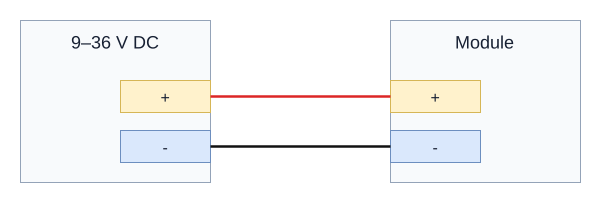
Module power: 9-36 VDC. Connect supply positive to + and negative to -.
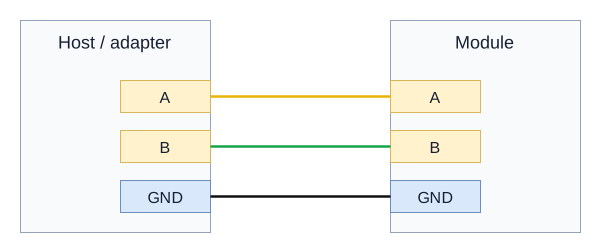
RS485 variant: A to A, B to B, signal GND to GND. TX/A and RX/B are the shared terminal labels. Use a twisted pair and terminate only the two physical bus ends when required.
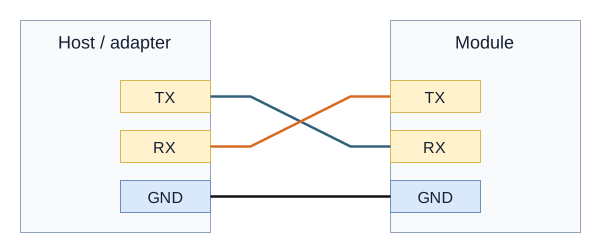
RS232 / TTL variant: cross TX and RX; connect GND to GND. Match the adapter's electrical interface and verify the TTL logic voltage before connecting.
See the Y201 User Manual for model-specific power and uplink connections.
2. Default Parameters
| Parameter | Default |
|---|---|
| Serial Baud Rate | 9600 |
| Data Bits / Stop Bits / Parity | 8 / 1 / NONE |
Packet Interval UARTTLn.tm | 5 ms |
Packet Length UARTTLn.len | 1024 |
| Socket Enable | Only Socket A on the single serial port enabled by default |
Offline Cache CACHEn | ON |
Registration Packet REGMDn | OFF |
Heartbeat Mode HEARTMDn | OFF |
Heartbeat Interval HEARTTMn | 60 s |
Extended AT EXAT | ALL, NAT@ |
Reboot on No Downlink Data SOCKRTO | 1440 min |
Remote Device Management RDM | OFF |
3. Serial Modes and Packetization
3.1 Serial Working Modes
- Transparent Mode, default: Serial data is forwarded to the network
- AT Mode: Serial input is executed as AT commands and network downlink data is discarded
3.2 Entering AT Mode
Recommended sequence:
- Send
+++ - Wait,
500 msrecommended and less than3 s - Send
a - Enter AT mode after receiving
+ok
Notes:
- After receiving
+++, the device pauses network data output for up to about3 s - AT mode is not saved across power cycles; the device returns to transparent mode after reboot
Exit AT mode with AT+EXIT or reboot the device.
3.3 Packetization, AT+UARTTLn
Transmission is triggered when either condition is met:
- Length trigger:
len >= packet length, range64 to 1024 - Interval trigger: inter-character gap
>= packet interval, range1 to 300 ms
Example:
text
AT+UARTTL1=30,1024
AT+REBOOT
4. Data Transfer and Sockets
4.1 Protocol Types
SOCKns.type supports:
TCPC: TCP clientUDPC: UDP clientHTPC: HTTP client, only onSOCKnAEDP: Peer-to-peer transmission, only onSOCKnASMS: SMS transparent transmission, only onSOCKnAMQTT: MQTT, only onSOCKnAHYTCP/HYMB: Cloud service forwarding, only onSOCKnA
4.2 Typical Configuration Flow, TCP Example
text
AT+SOCKEN1A=ON
AT+SOCK1A=TCPC,test.example.com,8168
AT+REBOOT
4.3 HTTP Example, POST
text
AT+SOCK1A=HTPC,www.example.com,80
AT+HTPURL1=/service/echo
AT+HTPHD1=Connection:keep-alive
AT+HTPREQ1=POST
AT+REBOOT
5. AT Command Conventions
5.1 Format Rules
- Commands start with
AT+and end with\ror\n - Commands are case-insensitive, uppercase is recommended
- Maximum command length is
256 bytes - Multiple parameters are separated by commas
- Wait for the previous command response before sending the next one, maximum timeout about
12 s - In command names,
nis1, identifying the single physical serial port, andsrepresents the Socket channelA/B
Call forms:
- Query:
AT+CMDorAT+CMD? - Set:
AT+CMD=v1,v2,... - Help:
AT+CMD=?
5.2 Error Codes
| Error Code | Meaning |
|---|---|
ARGS | Invalid parameter |
ARGC | Wrong number of parameters |
CMD_UNKNOWN | Unknown command |
CMD_FORMAT | Invalid format |
CMD_LENGTH | Command too long |
DEV_MEMORY | Memory error |
DEV_SAVE | Save failed |
6. AT Command Quick Reference
6.1 Basic Control and Status
| Command | Function | Notes |
|---|---|---|
AT+LIST | Command list | Preferred for debugging |
AT+EXIT | Exit AT mode | Returns to transparent mode |
AT+REBOOT | Reboot device | Applies parameters |
AT+RSTCFG | Restore backup parameters | Equivalent to Reload |
AT+BKCFG | Back up current parameters | Recommended after configuration |
AT+CLRCFG | Restore factory parameters | Full factory reset |
AT+DEVINFO | Device information | MODULE / VERSION / IMEI / SN and more |
AT+SOCKLK | Query TCP client status | Returns OFF for UDP or TCP server |
AT+CSQ | Signal strength | 0 / 1 / 2 to 30 / 31 / 99 |
AT+CEREG | Network registration status | 0 not registered, 1 registered |
AT+CGATT | Data network attach status | 0 detached, 1 attached |
AT+IP | Query IPv4 address | Current network address |
AT+IMEI | Query IMEI | 15 digits |
AT+ICCID | Query ICCID | Usually 20 digits |
AT+IMSI | Query IMSI | Usually 15 digits |
AT+PING=addr | Ping | Returns latency or error reason |
6.2 Serial, APN, and Socket
| Command | Range / Default |
|---|---|
AT+UARTn=<baud>,<data>,<stop>,<parity>,<fc> | baud 2400 to 460800, default 9600; data 7/8; stop 1/2; parity NONE/EVEN/ODD; fc NFC/485, default 485 |
AT+UARTTLn=<tm>,<len> | tm 1 to 300 ms, default 5; len 64 to 1024, default 1024 |
AT+CACHEn=<state> | ON, default / OFF |
AT+APN=<state>,<apn>,<user>,<pass>,<auth> | state: 0 default APN, default / 1 custom; auth: 0 NONE / 1 PAP / 2 CHAP |
AT+SOCKENns=<state> | ON / OFF, only 1A enabled by default |
AT+SOCKns=<type>,<addr>,<port> | type see Section 4; addr up to 64 bytes; port depends on protocol |
6.3 HTTP and MQTT
| Command | Range / Default |
|---|---|
AT+HTPURLn=<url> | URL 1 to 64 bytes, valid for POST |
AT+HTPHDn=<hd> | Header 1 to 64 bytes, use | for multiple headers |
AT+HTPFTn=<state> | ON, default and filters HTTP header / OFF |
AT+HTPREQn=<request> | GET / POST / AUTO |
AT+HTPTOn=<to> | 1 to 30 s, default 6 |
AT+MQCONFn=<ver>,<clean>,<keepalive> | ver 3/4, default 4; clean 0/1, default 1; keepalive 30 to 65535 s |
AT+MQAUTHn=<id>,<user>,<pass> | ID 1 to 64; user 1 to 64; pass 1 to 128 |
AT+MQSUBn=<enable>,<topic>,<qos> | enable 1, default / 0; topic 1 to 64; qos 0/1/2 |
AT+MQPUBn=<enable>,<topic>,<qos>,<retain> | Publish enabled by default; qos default 0; retain default 0 |
AT+MQWILLn=<enable>,<topic>,<qos>,<msg>,<retain> | Last will configuration |
AT+MQMDn=<mode> | STD, default / ALI |
6.4 SMS, Registration Packet, Heartbeat, and Transparent AT
| Command | Range / Default |
|---|---|
AT+SMSS=<num>,<msg> | Send SMS; msg does not support CR or LF |
AT+REGTPn=<type> | IMEI / ICCID / USER |
AT+REGMDn=<mode> | OFF, default / FIRST / EVERY / ALL |
AT+REGDATn=<data>,<fmt> | fmt: HEX, up to 64 bytes / ASCII, up to 32 bytes |
AT+HEARTMDn=<mode> | OFF, default / UART / NET |
AT+HEARTTMn=<time> | 1 to 86400 s, default 60 |
AT+HEARTDATn=<data>,<fmt> | fmt: HEX / ASCII |
AT+EXAT=<mode>,<key> | mode: OFF / NET / UART / ALL, default ALL; default key NAT@ |
AT+SOCKRTO=<time> | 0 to 4320 min, default 1440; 0 disables the function |
AT+DOWNLOAD=<uri> | HTTP download upgrade, returns OK or +ERROR:FAIL |
AT+DTCVTn=<up>,<down> | Data conversion: RAW / BTS / STB; up is serial-to-network and down is network-to-serial |
7. Modbus Polling and JSON Reporting
The full Modbus command family:
AT+MODBUSn: Modbus TCP / RTU gateway enableAT+MBCFGn: Polling enable, interval, and periodAT+MBCMDn: Polling command, HEX format, multiple commands separated with|AT+MBJSn: Combined Modbus and serial transparent reporting modeAT+HJREG: Register point table configuration for JSONAT+JSERRn: Control whether failed reads are reported asnullAT+JSUDn,AT+JSTMn,AT+JSIMEIn,AT+JSICCIDn,AT+JSIOn,AT+JSGPSn: Additional JSON fields
Key ranges:
MBCFGn.tv:100 to 35535 msMBCFGn.period:1 to 2592000 sMBJSn.mode:OFF / POLL / ALL
8. Maintenance, Upgrade, and Exception Handling
8.1 Upgrade
- Local USB upgrade, driver required
- HTTP upgrade through
AT+DOWNLOAD=host:port/path.bin
8.2 Parameter Partitions
- Parameter Area: Current runtime parameters
- Backup Area: Saved with
AT+BKCFG, restored withAT+RSTCFG - Factory Area: Restored with
AT+CLRCFG
Recommended flow:
- Configure parameters.
- Run
AT+BKCFG. - Use
AT+RSTCFGwhen rollback is required.
8.3 Exception Self-Recovery
AT+SOCKRTO=<time>controls automatic reboot on no downlink data- Default value is
24 hours, suitable for unattended deployments
9. Troubleshooting
| Symptom | Check Steps |
|---|---|
| Cannot register to the network | Check AT+CSQ, AT+CEREG, AT+CGATT, SIM status, and antenna status |
| Network is up but server is not connected | Check SOCKEN and SOCK parameters and use AT+SOCKLK to view connection status |
| Serial data is abnormal | Verify AT+UARTn settings match the field device and check UARTTLn packetization parameters |
| HTTP or MQTT fails | Check HTP* or MQ* parameters one by one and verify basic TCP transparent transmission first |
| Registration packet or heartbeat is invalid | Check whether REG* or HEART* is enabled and whether the mode matches the application |
| Frequent reboot | Check whether AT+SOCKRTO is set too short |
| Remote transparent AT does not work | Check AT+EXAT mode and key, default ALL,NAT@ |
- Manufacturer: Hunan YenGear Tech Co., Ltd.
- Address: Room 21014, Building 1, Fudi Xingguang Tiandi, Yingxin Road, Yuhua District, Changsha, Hunan, China
- Email: hi@yengear.com
- Website: www.yengear.com