
Appearance
Y201-W Technical Manual

Contents
- Overview
- Default Settings
- Quick Start
- Wi-Fi and Serial Working Mechanism
- Socket and Protocol Configuration
- Additional Functions
- AT Command Conventions and Common Commands
- Troubleshooting
1. Overview
Y201-W provides bidirectional transparent transmission between one serial port and 2.4 GHz Wi-Fi, with RS232, RS485 or TTL interface options. The serial port can be configured with Socket A and Socket B, supports TCP, UDP, HTTP, and MQTT, and can perform Modbus RTU to Modbus TCP conversion through the Modbus gateway.
The device supports two configuration entry points:
- Web UI, recommended for daily configuration and maintenance
- AT Commands, through serial AT or network AT
1.1 Hardware Wiring
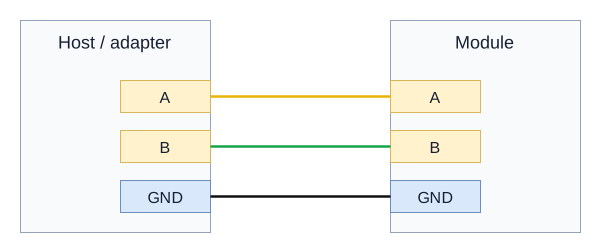
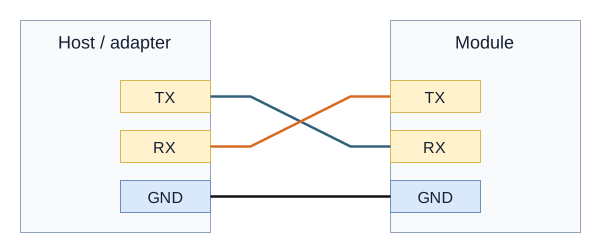
Power off before wiring. Select the ordered serial interface and use the terminal labels on the supplied module. The drawings show electrical connections, not connector pin order.
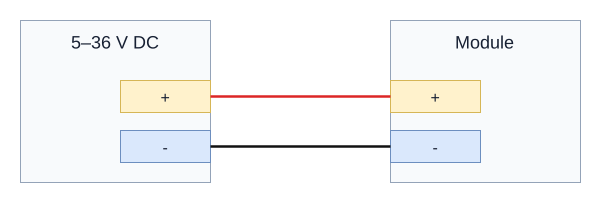
Module power: 5-36 VDC. Connect supply positive to + and negative to -.
RS485 variant: A to A, B to B, signal GND to GND. TX/A and RX/B are the shared terminal labels. Use a twisted pair and terminate only the two physical bus ends when required.
RS232 / TTL variant: cross TX and RX; connect GND to GND. Match the adapter's electrical interface and verify the TTL logic voltage before connecting.
See the Y201 User Manual for model-specific power and uplink connections.
2. Default Settings
| Item | Default |
|---|---|
| Web Management IP, AP mode | 192.168.4.1 |
| Web Username | admin |
| Web Password | admin |
| Wi-Fi Mode | AP+STA |
| Serial Baud Rate | 9600 |
| Serial Format | 8 / 1 / NONE |
| Socket Enable | Only Socket A on the single serial port enabled by default |
| Registration Packet | OFF |
| Heartbeat Packet | OFF |
| LAN Discovery Port | 8168 |
| LAN Discovery Keyword | HuayunIOT |
| Reboot on No Data | 1440 min, 24 hours |
3. Quick Start
3.1 Hardware Connection
- Connect the device to the PC or field controller with the serial cable.
- Power on the device.
- If default parameters must be restored, hold the
Resetbutton for more than5 s.
3.2 Log In to the Web UI
- Connect to the device's Wi-Fi hotspot using the SSID supplied with the device.
- Open
192.168.4.1in a browser. - Log in with
admin/admin.
3.3 TCP Server Quick Verification
- On the Port 1 page, set Socket A to
TCPServerand set the port to6666. - Save and reboot the device.
- On the PC, connect a TCP client to
192.168.4.1:6666. - Open the serial port tool with
9600/8/1/NONE. - Send and receive test data to verify bidirectional transparent transmission.
4. Wi-Fi and Serial Working Mechanism
4.1 Wi-Fi Modes
| Mode | Description |
|---|---|
AP | The device provides a hotspot and terminals connect to the device |
STA | The device joins an existing router or hotspot |
AP+STA | The device provides a hotspot while joining an existing router, default |
Notes:
- AP mode does not support hotspot scanning.
- AP+STA reduces wireless performance compared with single-mode operation.
- In STA or AP+STA mode, connect to a
2.4 GHzrouter or hotspot. A 5 GHz-only network cannot be used. - In AP+STA mode, the device's AP channel follows the connected router's channel.
- Confirm the supplied firmware's supported authentication mode before connecting to a secured network.
4.2 Serial Modes
The serial port supports two modes:
- Transparent Mode, default: Serial data is forwarded to the Socket
- AT Mode: Serial data is handled as AT commands
Recommended sequence for entering AT mode:
- Send
+++ - Wait about
500 ms, less than3 s - Send
a - Enter AT mode after receiving
+ok
Exit AT mode by sending AT+EXIT or by rebooting the device.
4.3 Packetization
Transmission is triggered when either condition is met:
- Length trigger: length
>= packet length, range8 to 1460 - Interval trigger: inter-character gap
>= packet interval, range0 to 1000 ms
5. Socket and Protocol Configuration
5.1 Socket Architecture
- The single serial port supports Socket A plus Socket B. These are network channels, not separate physical serial ports.
- When both channels are enabled, serial uplink data is duplicated and sent to both Sockets.
- Downlink data from both Sockets is merged onto the same serial output.
5.2 TCP Client and TCP Server
- TCP Client: Connects automatically after the device gets an IP address and retries every
1 son failure - TCP Server: Supports up to
8concurrent clients on one port and disconnects the earliest client if the limit is exceeded
Examples:
text
AT+SOCKEN1B=ON
AT+SOCK1B=TCPC,192.168.1.16,7788
AT+REBOOT
text
AT+SOCKEN1A=ON
AT+SOCK1A=TCPS,192.168.1.16,7788
AT+REBOOT
5.3 UDP Client and UDP Server
- UDP Client: Uses a fixed target address and a fixed local port is recommended
- UDP Server: Receives data from multiple clients and sends to the most recently active one
Examples:
text
AT+SOCKEN1B=ON
AT+SOCK1B=UDPC,192.168.1.16,7788,5678
AT+REBOOT
text
AT+SOCKEN1B=ON
AT+SOCK1B=UDPS,192.168.1.16,7788
AT+REBOOT
5.4 HTTP Client
Supports GET / POST / AUTO with HTTP 1.0 / 1.1:
text
AT+SOCK1A=HTPC,www.example.com,80
AT+HTPHD1=Connection:keep-alive
AT+HTPREQ1=GET
AT+REBOOT
text
AT+SOCK1A=HTPC,www.example.com,80
AT+HTPURL1=/service/echo
AT+HTPHD1=Connection:keep-alive
AT+HTPREQ1=POST
AT+REBOOT
5.5 MQTT
MQTT works as a transparent-like mechanism. The device handles subscribe and publish actions, while the terminal side only needs to process the payload.
Core commands:
AT+MQCONFn: Connection parameters, version, clean session, keepaliveAT+MQAUTHn: Authentication, ID, username, passwordAT+MQSUBn: Subscribe enable, topic, QoSAT+MQPUBn: Publish enable, topic, QoS, retainAT+MQWILLn: Last will messageAT+MQMDn: Mode selection,STDorALI
6. Additional Functions
6.1 Heartbeat Packet
AT+HEARTMDn:OFF / UART / NETAT+HEARTTMn:1 to 86400 s, default60AT+HEARTDATn: Heartbeat content, HEX,2 to 64 bytes
Notes:
- Network heartbeat only supports TCP and UDP client modes.
- Heartbeats pause while the device is in AT mode.
6.2 Registration Packet
AT+REGTPn:MAC / CUSAT+REGMDn:OFF / FIRST / EVERY / ALLAT+REGDATn: Custom content, HEX,2 to 64 bytes
6.3 LAN Discovery and Network AT
- Broadcast the keyword
HuayunIOTto UDP port8168to discover the device. - Network AT can be sent directly within
1 minuteafter discovery.
Related commands:
AT+SEARCH=<port>,<key>AT+PING=<addr>
6.4 Firmware Upgrade
- HTTP upgrade:
AT+DOWNLOAD=host:port/path.bin, returnsOKif the download succeeds and requires manual reboot to apply - Web upgrade: upgrade from the Web system page
6.5 Exception Handling
AT+SOCKRTO=<time>sets reboot on network inactivity;0disables it- Default value is
1440, which equals24 hours
7. AT Command Conventions and Common Commands
7.1 Command Rules
- Commands start with
AT+and end with\r\n - Send one command at a time; the maximum command length is
256 bytes - Parameters are saved automatically after being set and take effect after reboot
- Wait for the response to the previous command before sending the next one
7.2 Quick Commands
| Command | Function |
|---|---|
AT+LIST | List supported commands |
AT+EXIT | Exit AT mode |
AT+REBOOT | Reboot device |
AT+RSTCFG | Restore backup parameters and reboot |
AT+MAC | Query MAC address |
AT+VER | Query firmware version |
AT+DEVINFO | Query device information |
7.3 Common Error Codes
| Error Code | Meaning |
|---|---|
ARGS | Invalid parameter |
ARGC | Wrong number of parameters |
CMD_UNKNOWN | Unknown command |
CMD_FORMAT | Invalid format |
CMD_LENGTH | Command too long |
DEV_MEMORY | Memory error |
DEV_SAVE | Save failed |
8. Troubleshooting
| Symptom | Possible Cause | Recommended Action |
|---|---|---|
| Cannot access Web UI | The subnet does not match or the device is not in AP mode | Reset the device, connect to its Wi-Fi hotspot using the supplied SSID, and access 192.168.4.1 |
| Cannot join the router | The selected network is 5 GHz-only or its authentication mode is incompatible | Enable a 2.4 GHz network, check the SSID and password, and confirm authentication compatibility |
| TCP connection cannot be established | Wrong address or port, firewall blocking | Check Socket settings and open the required port |
| UDP can receive but not send | Local port not fixed or peer has not sent data | Set a fixed local port in UDP client mode and send one packet first |
| Serial communication is abnormal | Serial parameters do not match | Align baud rate, data bits, parity, and stop bits |
| Heartbeat is not sent | Mode mismatch or the device is still in AT mode | Check HEARTMDn, connection state, and exit AT mode |
| Registration packet is not reported | Registration mode is disabled | Check REGTPn, REGMDn, and REGDATn |
| Parameters are lost after reboot | Parameters were not backed up or rebooted correctly | Reboot after configuration and use BKCFG when needed |
| Frequent automatic reboot | SOCKRTO triggered | Adjust AT+SOCKRTO or disable the feature |
- Manufacturer: Hunan YenGear Tech Co., Ltd.
- Address: Room 21014, Building 1, Fudi Xingguang Tiandi, Yingxin Road, Yuhua District, Changsha, Hunan, China
- Email: hi@yengear.com
- Website: www.yengear.com